
Welcome to Zein!
Your fast, simple way to buy health insurance for yourself and your family — anytime, right from our website.
1. Documents You’ll Need Before You Start
Dubai Residents- Valid Emirates ID copy (mandatory)
- Valid visa copy (mandatory)
- Valid passport copy (mandatory)
- Valid eCard/CoC only if you’ve had previous UAE insurance and want to skip the 6‑month waiting period.
- Valid Emirates ID copy (optional)
- Valid visa copy (mandatory)
- Valid passport copy (mandatory)
- Valid eCard/CoC only if you’ve had previous UAE insurance and want to skip the 6‑month waiting period.
- Valid Emirates ID copy (optional)
- Valid visa copy, employment e-visa or change status document (mandatory)
- Valid passport copy (mandatory)
- CoC if you had previous insurance.
- Birth certificate accepted if under 2 months old
- After 2 months → Emirates ID is required.
2. Getting a Quote, paying and getting your eCards
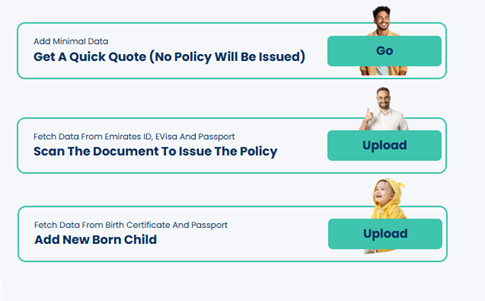 Get a Quick Quote
If you just want to check the rough price, select Quick Quote — no documents required.
Scan the Document to Issue the PolicySelect this for a formal quote and to start uploading your documents.
Add New Born ChildSelect this to upload birth certificate of your newborn child to issue their insurance.
3. Uploading Documents
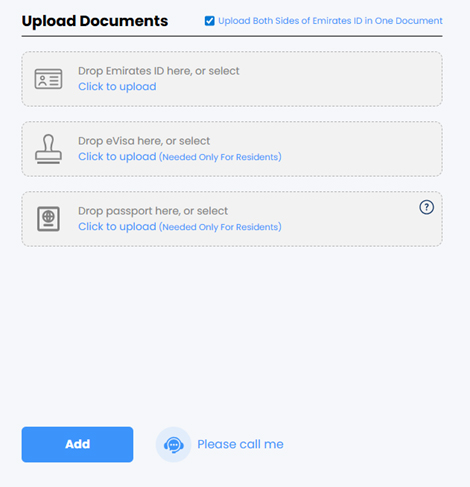 Emirates ID, Visa and Passport
- Upload each document separately – they should not be combined into one file
- Scans as pdf or pictures as jpg is readable by the portal
- Ensure all text is clear and document is fully visible
Use the '?' help icon for instructions and a weblink on how to obtain your UID number. Wrong UID prevents linking with DHPO/ICP.
4. Select your plan
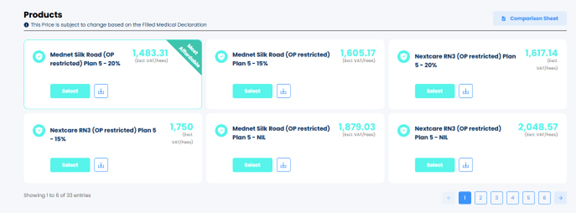
- By default, the most affordable option will be highlighted for you
- Scroll to the right to have a look at the more premium options
- Click on "Comparison Sheet" to select up to 4 plans to compare their benefits
5. Payment
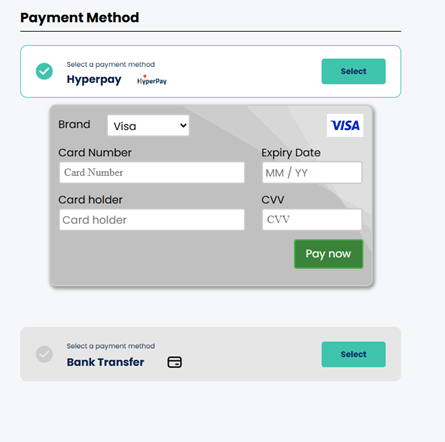 Paying for your own policy
Credit Card: Instant activation.
Bank Transfer: Upload receipt, confirmed within 1 working day.
6. Company paying for your policy – invoice to be under Company name
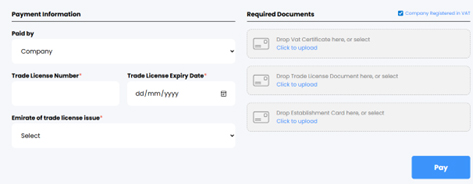
- Select “Company” in “Paid by” drop down
- Upload Trade License, VAT Certificate, Establishment Card.
- Click pay and the Payment link is emailed.
7. Final Step
Once payment is confirmed, your policy is issued and your eCard is sent to your email.